


 100
100
-
Power up both DDLS 200 units and make sure they complete their self-test.
-
The PWR/UL LED should be steady if everything is OK.
-
-
Coarse position the devices so they face each other with clear line-of-sight and are roughly aligned.
-
At this point it’s OK if data transmission isn’t yet established.
-
-
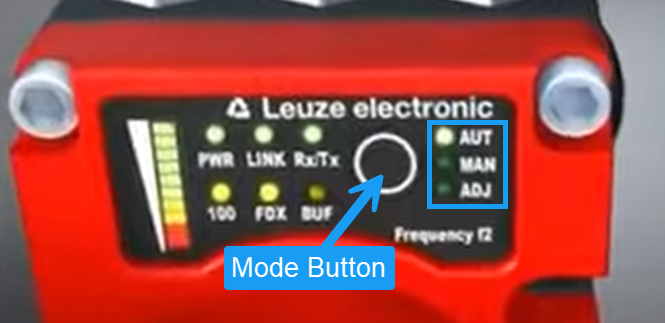
Switch both devices to manual mode (MAN) by pressing and holding the mode button for >2 s.
-
This disables automatic shut-off but keeps the system powered.
-
-
Move the units apart until data transmission is interrupted (e.g., loss of link).
-
This tells you where coarse alignment still needs improvement.
-
-
Enter fine-adjust mode (ADJ) by briefly pressing the mode button on each device.
-
Data transmission remains off so you can adjust without automatic resets.
-
-
Adjust alignment screws on each unit to maximize the signal level shown on the bar-graph indicators.
-
The goal is to center and maximize the received signal.
-
-
Return to manual mode by pressing the mode button briefly once you’re satisfied with alignment.
-
Confirm data transmission is restored.
-
-
Switch back to automatic mode (AUT) by pressing and holding the mode button for >2 s.
-
The devices are now aligned and ready for normal operation.
-

